Skip to content

Laptop

Wireless BCM4312 with the 3.10, 3.11, 3.12 and 3.13 kernels
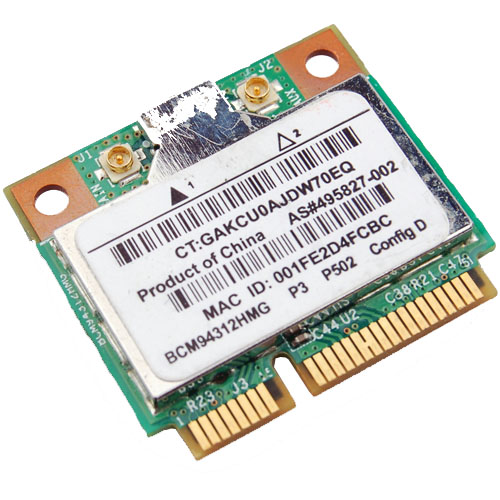
Broadcom Chipset BCM4312

The hybrid driver from Broadcom was updated again in September (2013) with all the previous patches and a few other fixes as well. This brings them up to support linux kernel 3.9, which is very much welcome.

Sadly it breaks again with >= 3.10 with many warnings and errors which isn't good considering that Ubuntu (13.10) Saucy Salamander is about to be released.

We do have a patch for you though that gets us working again up to the 3.11 kernel.

Chipsets supported by "Broadcom’s IEEE 802.11a/b/g/n hybrid Linux® device driver" are: BCM4311, BCM4312, BCM4313, BCM4321, BCM4322, BCM43224, BCM43225, BCM43227 and BCM43228.

The error you will run into:

bcurtis@Aria:~/Workspace/wl.orig$ make KBUILD_NOPEDANTIC=1 make -C /lib/modules/uname -r/build M=pwd make[1]: Entering directory /usr/src/linux-headers-3.11.0-11-generic' CFG80211 API is prefered for this kernel version Using CFG80211 API LD /home/bcurtis/Workspace/wl.orig/built-in.o CC /home/bcurtis/Workspace/wl.orig/src/shared/linux\_osl.o CC /home/bcurtis/Workspace/wl.orig/src/wl/sys/wl\_linux.o /home/bcurtis/Workspace/wl.orig/src/wl/sys/wl\_linux.c: In function ‘wl\_tkip\_printstats’: /home/bcurtis/Workspace/wl.orig/src/wl/sys/wl\_linux.c:3246:7: warning: passing argument 1 of ‘wl->tkipmodops->print\_stats’ from incompatible pointer type wl->tkip\_bcast\_data); ^ /home/bcurtis/Workspace/wl.orig/src/wl/sys/wl\_linux.c:3246:7: note: expected ‘struct seq\_file \*’ but argument is of type ‘char \*’ /home/bcurtis/Workspace/wl.orig/src/wl/sys/wl\_linux.c:3249:4: warning: passing argument 1 of ‘wl->tkipmodops->print\_stats’ from incompatible pointer type wl->tkipmodops->print\_stats(debug\_buf, wl->tkip\_ucast\_data); ^ /home/bcurtis/Workspace/wl.orig/src/wl/sys/wl\_linux.c:3249:4: note: expected ‘struct seq\_file \*’ but argument is of type ‘char \*’ /home/bcurtis/Workspace/wl.orig/src/wl/sys/wl\_linux.c: In function ‘wl\_reg\_proc\_entry’: /home/bcurtis/Workspace/wl.orig/src/wl/sys/wl\_linux.c:3470:2: error: implicit declaration of function ‘create\_proc\_entry’ [-Werror=implicit-function-declaration] if ((wl->proc\_entry = create\_proc\_entry(tmp, 0644, NULL)) == NULL) { ^ /home/bcurtis/Workspace/wl.orig/src/wl/sys/wl\_linux.c:3470:22: warning: assignment makes pointer from integer without a cast if ((wl->proc\_entry = create\_proc\_entry(tmp, 0644, NULL)) == NULL) { ^ /home/bcurtis/Workspace/wl.orig/src/wl/sys/wl\_linux.c:3475:16: error: dereferencing pointer to incomplete type wl->proc\_entry->read\_proc = wl\_proc\_read; ^ /home/bcurtis/Workspace/wl.orig/src/wl/sys/wl\_linux.c:3476:16: error: dereferencing pointer to incomplete type wl->proc\_entry->write\_proc = wl\_proc\_write; ^ /home/bcurtis/Workspace/wl.orig/src/wl/sys/wl\_linux.c:3477:16: error: dereferencing pointer to incomplete type wl->proc\_entry->data = wl; ^ cc1: some warnings being treated as errors make[2]: \*\*\* Error 1 make[1]: \*\*\* Error 2 make[1]: Leaving directory/usr/src/linux-headers-3.11.0-11-generic' make: *** Error 2

The rundown:

  1. Download the 32 or 64-bit version: http://www.broadcom.com/support/802.11/linux_sta.php
  2. Download the patch: wl_3.10.patch
  3. Extract the sources: cd ~/Downloads; mkdir -p wl; cd wl; tar xf ../hybrid-*.tar.gz
  4. Patch and compile the sources: patch -p2 < ~/Downloads/wl_3.10.patch; make; sudo make install; sudo depmod; sudo modprobe wl

Give Ubuntu a few seconds after loading the "wl" kernel module, then eventually the Network Manager will start looking for wireless networks.

TL;DR: These patches are required for a working wl kernel module for the 3.10 and 3.11 kernel series.

Update (2014-04-22): Known to also work with Raring (14.04) that uses the 3.13 kernel.
Wireless BCM4312 with the 3.6, 3.7 and 3.8 kernel

Broadcom Chipset BCM4312

As a follow up to , I've also tested the Broadcom hybrid driver with the 3.6, 3.7 and the soon to be released 3.8 kernels with success. There have been no major changes that should effect the operation of this driver.

To verify that everything is working as expected on the software side, when modprobe or insmod wl, you should get a similar dmesg output:

[ 307.560347] lib80211: common routines for IEEE802.11 drivers [ 307.560353] lib80211_crypt: registered algorithm 'NULL' [ 307.564524] wl: module license 'unspecified' taints kernel. [ 307.564529] Disabling lock debugging due to kernel taint

The only real issue at this point is this:

WARNING: modpost: missing MODULE_LICENSE() in /home/bcurtis/workspace/wl/wl.o see include/linux/module.h for more information WARNING: modpost: Found 1 section mismatch(es). To see full details build your kernel with: 'make CONFIG_DEBUG_SECTION_MISMATCH=y' CC /home/bcurtis/workspace/wl/wl.mod.o LD /home/bcurtis/workspace/wl/wl.ko

While these aren't errors, they are problems to be addressed upstream by Broadcom if they wish to see their driver to be used in the future. They will also need to incorporate my patch sets from my previous post. They haven't updated their driver in about two years now.

Wireless BCM4312 with the 3.4 and 3.5 kernel

Broadcom Chipset BCM4312

The hybrid driver from Broadcom is still a bit behind in terms of support for the latest kernels but there are workarounds. This particular issue also effects other kernel modules such as the out of tree Nvidia and ATI blobs that require the asm/system.h file in their includes.

I've had success with replacing it with asm/switch_to.h which seems to have fixed things for now. The cause for this can be found on the LKML.

Chipsets supported by "Broadcom’s IEEE 802.11a/b/g/n hybrid Linux® device driver" are: BCM4311, BCM4312, BCM4313, BCM4321, BCM4322, BCM43224, and BCM43225, BCM43227 and BCM43228.

Errors:

bcurtis@ronin:~/workspace/wl$ make KBUILD_NOPEDANTIC=1 make -C /lib/modules/uname -r/build M=pwd make[1]: Entering directory /usr/src/linux-headers-3.5.0-030500rc3-generic' Wireless Extension is the only possible API for this kernel version Using Wireless Extension API LD /home/bcurtis/workspace/wl/built-in.o CC /home/bcurtis/workspace/wl/src/shared/linux\_osl.o CC /home/bcurtis/workspace/wl/src/wl/sys/wl\_linux.o /home/bcurtis/workspace/wl/src/wl/sys/wl\_linux.c:43:24: fatal error: asm/system.h: No such file or directory compilation terminated. make[2]: \*\*\* Error 1 make[1]: \*\*\* Error 2 make[1]: Leaving directory/usr/src/linux-headers-3.5.0-030500rc3-generic' make: *** Error 2

The rundown:

  1. Download the 32 or 64-bit version: http://www.broadcom.com/support/802.11/linux_sta.php
  2. Download my patches: bc_wl_abiupdate.patch and switch_to.patch
  3. Extract the sources: cd ~/Downloads; mkdir -p wl; cd wl; tar xf ../hybrid-portsrc*.tar.gz
  4. Patch and compile the sources: patch -p0 src/wl/sys/wl_linux.c < ~/Downloads/switch_to.patch; patch -p0 src/wl/sys/wl_linux.c < ~/Downloads/bc_wl_abiupdate.patch; make; sudo make install; sudo depmod; sudo modprobe wl

Give Ubuntu a few seconds after loading the "wl" kernel module, then eventually the Network Manager will start looking for wireless networks.

TL;DR: These patches are required for a working wl kernel module for the 3.4 and 3.5 kernel series.

Update: Also verified to work with Linux 3.6 series.

Ubuntu 12.04 (Precise) and AMD Catalyst 12.4

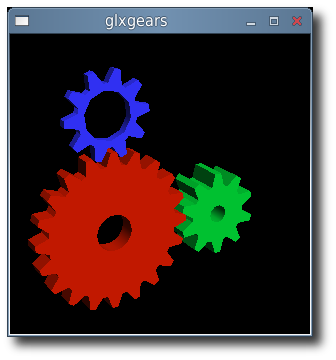
glxgears

Precise Pangola has been released and a day later comes a new fglrx driver. While there isn't a changelog, this build apparently gives us:

early-look support for Ubuntu 12.04, Linux PowerXpress support for the Intel Ivy Bridge platform, packaging script updates, and various bug-fixes.

Among the bug-fixes for Catalyst 12.4 on Linux are: fixing some multi-head issues, a system hang in certain PowerXpress configurations, fixing a system hang when using OpenGL overlays, correcting an OpenGL performance drop, a soft-hang when killing the X Server, and severe corruption for OpenGL games using the AMD "Redwood" graphics processors.

If you want to build these for yourself then you can follow these instructions:

  1. Download 64-bit 12.4 from AMD
  2. Extract the files from the package: sh ./amd-driver-installer-12-4-x86.x86_64.run --extract ati
  3. Build your new ati/fglrx deb packages: ./ati-installer.sh 8.961 --buildpkg Ubuntu/precise
  4. Install our newly created deb packages: sudo dpkg -i ../fglrx*.deb
  5. If your /etc/X11/xorg.conf is missing you will need to run: sudo aticonfig --initial and then reboot.

That newly created package should work for 3.2 kernel series in Precise.

Wireless BCM4312 3.2 kernel

Broadcom Chipset BCM4312

Since there is an Ubuntu package 'firmware-b43-lpphy-installer' which is up to date and will work against the 3.0 kernel, my earlier posts are obsolete. If you are not running Ubuntu, then you will still need to reference my post.

The latest 3.2 Linux kernel however has a few ABI changes, most notably in the network stack which effects the Broadcom's wl module. Most notably is: .ndo_set_multicast_list which was replaced with .ndo_set_rx_mode.

My specific chipset from lspci command:

Broadcom Corporation BCM4312 802.11b/g LP-PHY (rev 01)

Below is the error I get with v5_100_82_38 from Broadcom when compiling against Linux kernel 3.2:

bcurtis@zwartevogel:~/Downloads/wl$ sudo make KBUILD_NOPEDANTIC=1 make -C /lib/modules/3.2.0-030200rc1-generic/build M=pwd make[1]: Entering directory /usr/src/linux-headers-3.2.0-030200rc1-generic' LD /home/bcurtis/Downloads/wl/built-in.o CC /home/bcurtis/Downloads/wl/src/shared/linux\_osl.o CC /home/bcurtis/Downloads/wl/src/wl/sys/wl\_linux.o /home/bcurtis/Downloads/wl/src/wl/sys/wl\_linux.c:326:2: error: unknown field ‘ndo\_set\_multicast\_list’ specified in initializer /home/bcurtis/Downloads/wl/src/wl/sys/wl\_linux.c:326:2: warning: initialization from incompatible pointer type /home/bcurtis/Downloads/wl/src/wl/sys/wl\_linux.c:326:2: warning: (near initialization for ‘wl\_netdev\_ops.ndo\_validate\_addr’) make[2]: \*\*\* Error 1 make[1]: \*\*\* Error 2 make[1]: Leaving directory/usr/src/linux-headers-3.2.0-030200rc1-generic' make: *** Error 2

To get your wireless adapter working again:

  1. Download this patch: bc_wl_abiupdate.patch
  2. patch -p0 src/wl/sys/wl_linux.c < bc_wl_abiupdate.patch
  3. sudo make; sudo make install; sudo depmod; sudo modprobe wl

Give Ubuntu a few seconds after loading the "wl" kernel module, then eventually the Network Manager will start looking for wireless networks.

Chipsets supported by "Broadcom's IEEE 802.11a/b/g/n hybrid Linux® device driver" are: BCM4311, BCM4312, BCM4313, BCM4321, BCM4322, BCM43224, and BCM43225, BCM43227 and BCM43228.

Wireless BCM4312 3.0 kernel

Broadcom Chipset BCM4312

With the latest 3.0 kernel there is still no "out of the box" support for my BCM4312 wireless chipset. Nor is there any help from Ubuntu 11.04 leaving me to use Broadcoms hybrid driver with patch.

Chipsets supported by "Broadcom's IEEE 802.11a/b/g/n hybrid Linux® device driver" are: BCM4311, BCM4312, BCM4313, BCM4321, BCM4322, BCM43224, and BCM43225, BCM43227 and BCM43228.

My specific chipset from lspci command:

Broadcom Corporation BCM4312 802.11b/g LP-PHY (rev 01)

Below is the error I get with v5_100_82_38 from Broadcom when compiling against Linux kernel 3.0:

bcurtis@zwartevogel:~/Downloads/wl.org$ make KBUILD_NOPEDANTIC=1 make -C /lib/modules/uname -r/build M=pwd make[1]: Entering directory /usr/src/linux-headers-2.6.38-020638-generic' LD /home/bcurtis/Downloads/wl.org/built-in.o CC /home/bcurtis/Downloads/wl.org/src/shared/linux\_osl.o CC /home/bcurtis/Downloads/wl.org/src/wl/sys/wl\_linux.o /home/bcurtis/Downloads/wl.org/src/wl/sys/wl\_linux.c: In function ‘wl\_attach’: /home/bcurtis/Downloads/wl.org/src/wl/sys/wl\_linux.c:485:3: error: implicit declaration of function ‘init\_MUTEX’ make[2]: \*\*\* Error 1 make[1]: \*\*\* Error 2 make[1]: Leaving directory/usr/src/linux-headers-3.0.0-0300rc1-generic' make: *** Error 2

To get your wireless adapter working again:

  1. Download the 32 or 64-bit version: http://www.broadcom.com/support/802.11/linux_sta.php
  2. Download my patch for > 2.6.37 support: broadcom-sta_4_kernel-2.6.38.patch
  3. Extract the sources: cd ~/Downloads; mkdir -p wl; cd wl; tar xf ../hybrid-portsrc*-v5_100_82_38.tar.gz
  4. Patch the sources, compile and install: patch -p1 < ../broadcom-sta_4_kernel-2.6.38.patch make; sudo make install; sudo depmod; sudo modprobe wl

Give Ubuntu a few seconds after loading the "wl" kernel module, then eventually the Network Manager will start looking for wireless networks.

Wireless BCM4312 on Ubuntu with 2.6.38 and 2.6.39 kernel

Broadcom Chipset BCM4312

My Vostro 1510 comes with an on-board wireless miniPCI card but it does not work "out of the box" with Ubuntu, even with the latest 2.6.39 kernel. The only option that works for me is the binary hybrid blob driver provided by Broadcom, but even that is out of date. They need help in order to work with 2.6.36 and upwards and I have a patch for that.

Chipsets supported by "Broadcom's IEEE 802.11a/b/g/n hybrid Linux® device driver" are: BCM4311, BCM4312, BCM4313, BCM4321, BCM4322, BCM43224, and BCM43225, BCM43227 and BCM43228.

The my exact chipset from lspci command:

Broadcom Corporation BCM4312 802.11b/g LP-PHY (rev 01)

Below is the error I get with v5_100_82_38 from Broadcom when compiling against 2.6.38 and 2.6.39:

bcurtis@zwartevogel:~/Downloads/wl.org$ make KBUILD_NOPEDANTIC=1 make -C /lib/modules/uname -r/build M=pwd make[1]: Entering directory /usr/src/linux-headers-2.6.38-020638-generic' LD /home/bcurtis/Downloads/wl.org/built-in.o CC /home/bcurtis/Downloads/wl.org/src/shared/linux\_osl.o CC /home/bcurtis/Downloads/wl.org/src/wl/sys/wl\_linux.o /home/bcurtis/Downloads/wl.org/src/wl/sys/wl\_linux.c: In function ‘wl\_attach’: /home/bcurtis/Downloads/wl.org/src/wl/sys/wl\_linux.c:485:3: error: implicit declaration of function ‘init\_MUTEX’ make[2]: \*\*\* Error 1 make[1]: \*\*\* Error 2 make[1]: Leaving directory/usr/src/linux-headers-2.6.38-020638-generic' make: *** Error 2

To get your wireless adapter working again:

  1. Download the 32 or 64-bit version: http://www.broadcom.com/support/802.11/linux_sta.php
  2. Download my patch: broadcom-sta_4_kernel-2.6.38.patch
  3. Extract the sources: cd ~/Downloads; mkdir -p wl; cd wl; tar xf ../hybrid-portsrc*-v5_100_82_38.tar.gz
  4. Patch the sources: patch -p1 < ../broadcom-sta_4_kernel-2.6.38.patch make; sudo make install; sudo depmod; sudo modprobe wl

Give Ubuntu a few seconds after loading the "wl" kernel module, then eventually the Network Manager will start looking for wireless networks.

Update: This patch and the resulting wl kernel module also works with 2.6.39 kernel series. I have updated content above to reflect this.

Ubuntu 10.10 Maverick with 2.6.37 kernel

glxgears

If you want the latest (read bleeding edge) kernel that the Ubuntu developers are working, then have a look here:

Ubuntu Dev Kernels

Be sure to download the 3 files matching your architecture and install.

I am currently using 2.6.37-rc3-natty which will be the kernel that Natty Narwhal (11.04) will be based on. It just works, everything is detected and there is a noticeable increase in responsiveness.

Previously I posted about the 200~ kernel patch to increase desktop responsiveness. You do not need to wait for a new kernel or recompile one yourself to test the benefits. According to this Linux kernel mailing list: While the correct way is to implement it in kernel to be transparent to the user, you can enable it with a few quick entires in to your ~/.bashrc file. if [ "$PS1" ] ; then mkdir -m 0700 /sys/fs/cgroup/cpu/user/$$ echo $$ > /sys/fs/cgroup/cpu/user/$$/tasks fi

Then, as the superuser do this: mount -t cgroup cgroup /sys/fs/cgroup/cpu -o cpu mkdir -m 0777 /sys/fs/cgroup/cpu/user

"Done. Same effect. However: not crazy."

Thank you Lennart.

xorg 1.9 versus fglrx

With the release of Ubuntu (Meerkat) 10.10 just 10 days away, the ubuntu x-swat people have been busy getting fglrx ready for release. The fglrx now compiles against latest Meerkat kernel and finally resolves the unknown symbol issue.

xswat-64

In the laptop is a ATI Mobility Radeon HD 3670 and with the latest fglrx driver usability is awful. There is horrible tearing when using "Appearance -> Visual Effects -> Normal", which had to be set back to "None" just to be usable. Even on "None", scrolling down in documents, chrome, firefox and Skype all give blurred or stuttered graphics.

These are for me "do not use" releases.

There are so far two updates. The first one gets fglrx up to date to latest Meerkat.

fglrx-installer (2:8.780-0ubuntu1) maverick; urgency=low * New upstream release. - Fix build issues with kernel fix for CVE-2010-3081 (LP: #642518). - Add compatibility with 2.6.35 kernels (LP: #573748). - Add compatibility with xserver 1.9 (LP: #630599). * Make the driver Depend on the appropriate xserver-xorg-video-$ABI (LP: #616215).

The latest update adds 2.6.36 kernel support:

fglrx-installer (2:8.780-0ubuntu2) maverick; urgency=low * debian/fglrx.postinst: - Call dpkg-trigger with "--by-package". * Add add-compatibility-with-2.6.36-kernels.patch: - Fix build issues with 2.6.36 kernels. * Add use-cflags_module-together-with-modflags.patch: - Fix build issues with kernels that don't have MODFLAGS and use CFLAGS_MODULE.

There will hopefully be more releases soon that help to resolve these issues

Ubuntu 10.10 Maverick Meerkat on Dell Studio XPS 1640

After a brief time with Karmic (10.04), the laptop was upgraded to the beta of Maverick. Everything works out of the box with no additional tricks necessary in getting the Dell Studio XPS 1640 fully functional.

ubuntu-maverick-meerakat

The only drawback I found in upgrading from Karmic was the loss of fglrx as a xorg-server driver. Maverick is shipping with the 1.9 version of xorg-server which is ABI incompatible with what fglrx is compiled against.

The exact error is: undefined symbol: savedScreenInfo which causes X not to start.

The rumour is that ATI will release a fglrx package that is compiled against 1.9 version of xorg-server when Maverick ships on Sunday, October 10th.

Compiling the fglrx against the latest kernel is also not a problem if you follow the advice found here.

This does not impact a good desktop experience with your "Visual Effects" set to "Normal". By default, Maverick ships with the latest radeon driver that xorg-server which is good enough to handle all those lovely desktop effects. I recommend this driver over fglrx because:

  • it is opensource
  • has acceptable 2d/3d performance
  • it is not a resource hog
  • the laptop will no longer burn your lap

I will continue testing against fglrx and I look forward to the final release.

Maverick Meerkat Release Schedule

UPDATE: If you have upgraded to Maverick and switched to the radeon driver after first having fglrx, you will need to purge your fglrx drivers. What happens is that X will start with the radeon driver but load your fglrx glx libraries and cause a segmentation fault or garbled screen.

To fix this: aptitude purge fglrx fglrx-amdcccle fglrx-modaliases xorg-driver-fglrx fglrx-dev