Skip to content

2011

A poor man's https, using ssh to secure web traffic

HTTPS_Everywhere_new_logo

Sometimes you get a web-hosting environment that only serves non-ssl (http) content. If you need to do any type of management through tools like phpMyAdmin, then you can see the problem with this. All it would take is someone on your network or on the Internet to sniff the traffic and retrieve your username and password, then they too can do a bit of "management" on your site.

If you also have secure shell (SSH) access, then there is a way to manage your site securely by using SSH's venerable port forwarding (SOCKS). The trick is to tell your management tools to only listen or respond to connections coming in over SSH instead of normal traffic. First you need to set up your SSH connection and configure your browser to use your newly made SOCKS proxy. Please refer to my post about SSH Proxies for more information.

The second part is to secure your application to only accept connections from itself, which is where your browser requests travels through your secure tunnel. We can mask it a bit so that you will have to look hard to see that there is something of interest going on there. It will also be ignored by Google and other search engines.

You can add this to your php code: /* custom code to deny access to world */ if ($_SERVER["SERVER_ADDR"] != $_SERVER["REMOTE_ADDR"]){ header('HTTP/1.1 404 Not Found'); exit();

If the remote IP (your request) is not he same as the server IP, then we give the 404 error message in return, otherwise you get to your application.


SSH as a socks proxy

passwords

Recently there was a need to visit a US based website to verify some personal information. Apparently there are 'rules' about who is geographical allowed to get access to the site which means that a citizen of said country cannot access the site from outside of the US.

I will not get into the absurdity of such security mandates, instead we will go around the problem and get our information that bureaucracy tried to prevent.

The general idea is to use a proxy inside the US that will allow us to hop over the geographical firewall. I do not trust open proxies by default because of their ability to sniff traffic. I do however have access to a secure shell (SSH) in the US that I can use. Using this command: ssh -D 8080 [email protected]

will create a port 8080 on localhost (your computer). You can then use a web-browser like chrome from anywhere in the world and through an encrypted tunnel come out the other side on a network based in the US. You need to configure your web-browser to use a 'SOCKS Proxy' in order for this to work.

For chrome, it is easy as doing this: chrome --proxy-server="socks5://127.0.0.1:8080" or you can follow this guide to setting up chrome with socks.

To check that it is working, go to google and ask "What is my IP".

For more detailed information, here is the ssh man page:

Specifies a local “dynamic” application-level port forwarding. This works by allocating a socket to listen to port on the local side, optionally bound to the specified bind_address. Whenever a connection is made to this port, the connection is forwarded over the secure channel, and the application protocol is then used to determine where to connect to from the remote machine. Currently the SOCKS4 and SOCKS5 protocols are supported, and ssh will act as a SOCKS server.

Better password security through length

passwords

As comically seen on xkcd, a password's length is more important than its complexity. What we should take away from the comic is that short but hard to remember passwords are easiest to crack while long and easy to remember passwords are harder to crack.

Try for yourself with my online password cracking calculator.

As an example, we will compare two passwords: "Tr0ub4dor&3" and "correct horse battery staple". We will assume that a brute-force machine that can theoretically do 200,000,000 guesses per second, which is more pessimistic than a machine with four ATI HD 5970s at 22,400,000 guesses per second. It would take such a machine about 242,243,228 days to guess "Tr0ub4dor&3". It would take the latter password 9.62x10^41 days to guess. Now if law enforcement (or Anonymous) gets involved, you can expect some distributive computing to help increase the effectiveness of the attack. With a botnet of 100,000 computers with GPUs the first password goes to 86,515 days to crack while the later 3.436*10^36 days to guess.

We can only expect that with existing trends that hardware and software will become more efficient. The mathematics help prove a point, that short complex passwords are more easily cracked than long passwords. A long but easily remembered password is mathematically a safer bet.

Note of warning: Best practices with passwords still apply because of other attack vectors like dictionary attacks, common word compounding and mutations of words such as 0s for Os and other such substitutions.

Observation: Choose the first sentence of a random book and memorize it, punctuation and all. You should be safe for the immediate 10 years.

Asymmetric networking using Linux

asymmetric_network_icon

The idea is simple, two subnets (separate networks) and then route packets from one to the other. The environment, however, is not symmetric. We wanted to contact a node on the other subnet and we could see the packets travelling over the switch to the router back through another switch to the node, but the node itself refused to reply. Each node has two NICs and each NIC is connected to a separate network. If you try to connect or ping one node from another, Linux is smart enough to go directly over the NIC with the right network. If a NIC should ever fail, the failover is that the packets are then routed up one network to the router then over to the other network. The network looks something like this:

        ----(router)----
        |               |
        |               |
   | switch |__  __| switch |
        |      \/       |
        |      /\       |
        |     /  \      |
        |    x    \     |
   | node1 |/      \| node2 |

note: The x is the broken link.

Apparently when going from node1 to node2 is not the problem, node2 just does not respond. This has to do Reverse Path Filtering and per default is enabled in the Linux kernel. From the manual:

By default, routers route everything, even packets which 'obviously' don't belong on your network. A common example is private IP space escaping onto the internet. If you have an interface with a route of 195.96.96.0/24 to it, you do not expect packets from 212.64.94.1 to arrive there. ... Basically, if the reply to this packet wouldn't go out the interface this packet came in, then this is a bogus packet and should be ignored.

Armed with this new knowledge and acknowledging that this system will not be on an Internet route-able environment, we decided to turn off the filtering. for i in /proc/sys/net/ipv4/conf/*/rp_filter ; do echo 0 > $i; done This solved the problem and node2 could reply back over it's NIC to the other network without having to go back through the router.

Wireless BCM4312 3.2 kernel

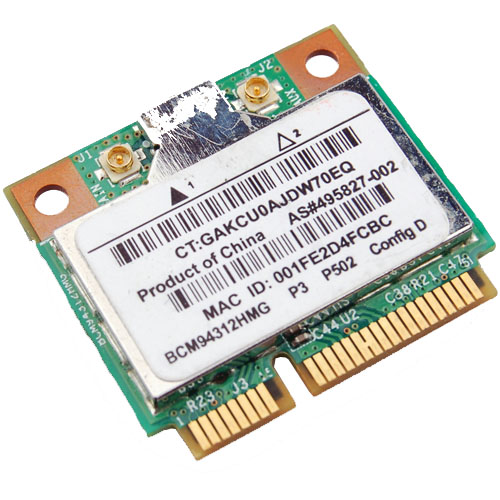
Broadcom Chipset BCM4312

Since there is an Ubuntu package 'firmware-b43-lpphy-installer' which is up to date and will work against the 3.0 kernel, my earlier posts are obsolete. If you are not running Ubuntu, then you will still need to reference my post.

The latest 3.2 Linux kernel however has a few ABI changes, most notably in the network stack which effects the Broadcom's wl module. Most notably is: .ndo_set_multicast_list which was replaced with .ndo_set_rx_mode.

My specific chipset from lspci command:

Broadcom Corporation BCM4312 802.11b/g LP-PHY (rev 01)

Below is the error I get with v5_100_82_38 from Broadcom when compiling against Linux kernel 3.2:

bcurtis@zwartevogel:~/Downloads/wl$ sudo make KBUILD_NOPEDANTIC=1 make -C /lib/modules/3.2.0-030200rc1-generic/build M=pwd make[1]: Entering directory /usr/src/linux-headers-3.2.0-030200rc1-generic' LD /home/bcurtis/Downloads/wl/built-in.o CC /home/bcurtis/Downloads/wl/src/shared/linux\_osl.o CC /home/bcurtis/Downloads/wl/src/wl/sys/wl\_linux.o /home/bcurtis/Downloads/wl/src/wl/sys/wl\_linux.c:326:2: error: unknown field ‘ndo\_set\_multicast\_list’ specified in initializer /home/bcurtis/Downloads/wl/src/wl/sys/wl\_linux.c:326:2: warning: initialization from incompatible pointer type /home/bcurtis/Downloads/wl/src/wl/sys/wl\_linux.c:326:2: warning: (near initialization for ‘wl\_netdev\_ops.ndo\_validate\_addr’) make[2]: \*\*\* Error 1 make[1]: \*\*\* Error 2 make[1]: Leaving directory/usr/src/linux-headers-3.2.0-030200rc1-generic' make: *** Error 2

To get your wireless adapter working again:

  1. Download this patch: bc_wl_abiupdate.patch
  2. patch -p0 src/wl/sys/wl_linux.c < bc_wl_abiupdate.patch
  3. sudo make; sudo make install; sudo depmod; sudo modprobe wl

Give Ubuntu a few seconds after loading the "wl" kernel module, then eventually the Network Manager will start looking for wireless networks.

Chipsets supported by "Broadcom's IEEE 802.11a/b/g/n hybrid Linux® device driver" are: BCM4311, BCM4312, BCM4313, BCM4321, BCM4322, BCM43224, and BCM43225, BCM43227 and BCM43228.

Build environments using chroot

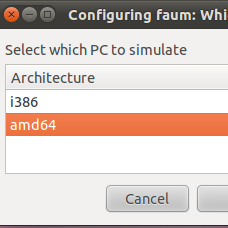
i386 or amd64

The need was simple enough: make deb packages from source for multiple architectures on the same system. This needed to be done without the overhead of a virtual machine and without using something like launchpad.

I've used chroot in the past and it seemed like a perfect fit for the problem. The idea is to have at least two chroot-able directories with the bare essentials from Ubuntu Natty (10.04) to compile and build deb packages. Here is a simple way to accomplish this: sudo apt-get install dchroot debootstrap sudo debootstrap --arch i386 natty /opt/chroot_i386/ http://archive.ubuntu.com/ubuntu sudo debootstrap --arch amd64 natty /opt/chroot_amd64/ http://archive.ubuntu.com/ubuntu sudo chroot /opt/chroot_amd64 locale-gen en_US en_US.UTF-8 dpkg-reconfigure locales exit sudo chroot /opt/chroot_i386 locale-gen en_US en_US.UTF-8 dpkg-reconfigure locales exit

The next step is to update your apt repositories and get the latest updates and upgrades. Overwrite /etc/apt/sources.list in your respective chroots with the following: deb http://be.archive.ubuntu.com/ubuntu/ natty main universe multiverse restricted deb http://be.archive.ubuntu.com/ubuntu/ natty-updates main universe multiverse restricted deb http://be.archive.ubuntu.com/ubuntu/ natty-backports main universe multiverse restricted deb http://archive.canonical.com/ubuntu natty partner deb http://security.ubuntu.com/ubuntu natty-security main universe multiverse restricted

In each chroot we update to latest packages and install our build environment. apt-get update apt-get dist-upgrade -y apt-get install build-essential

While you are setting up one chroot environment and you want to mirror the installed packages in another chroot, then you can do the following.

Make a list: dpkg --get-selections > installed-software

Use list to install necessary packages: dpkg --set-selections < installed-software dselect install

This should get you going for compiling and building in separate environments. This technique could also be used for non-debian based distributions as well.

Skype on Ubuntu 11.10 (Oneiric Ocelot)

skype

If you upgrade to Ubuntu 11.10 on a 64-bit platform and try to run skype then you will likely get this error:

skype: error while loading shared libraries: libXss.so.1: cannot open shared object file: No such file or directory

This is because libxss1 and a few other libraries have been removed from ia32-libs package.

You will need to enable multiarch and install the extra 32 bit libraries by hand: echo foreign-architecture i386 | sudo tee /etc/dpkg/dpkg.cfg.d/multiarch sudo aptitude update sudo aptitude install libxss1:i386 libqtcore4:i386 libqt4-dbus:i386

This is all that is required to get the statically compiled version of Skype to work.

If you are running the dynamically compiled version or one that comes from mediabuntu or other source, you will need to pull in an extra package. sudo aptitude install libqtgui4:i386

However, in my experience this pulls in too many unnecessary packages and some of them may be broken.

Update: I've done a fresh install of Oneiric and determined the following list of packages that need to be install to get skype working. In the mean time, please bug/pester Skype for real 64bit binaries.

sudo aptitude install libxss1:i386 libqtcore4:i386 libqt4-dbus:i386 libasound2:i386 libxv1:i386 libsm6:i386 libxi6:i386 libXrender1:i386 libxrandr2:i386 libfreetype6:i386 libfontconfig1:i386

Kabouter: a gnome terminal based multi-ssh connector

kabouter

Kabouter is Dutch for gnome and also a tool to connect to a range of IP addresses via ssh. It uses gnome-terminal to manage the sessions which, for me, seems more natural than some of the other 3rd party SSH applications available.

Usage is simple:

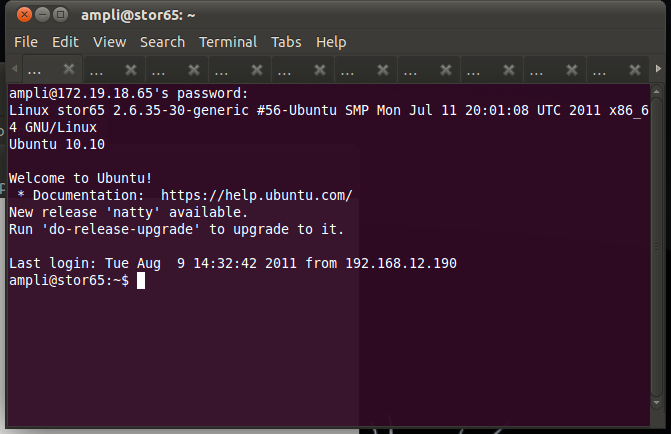
bcurtis@ronin:~$ kabouter ampli 172.19.18.65 172.19.18.96

This creates a gnome-terminal session with 32 tabs connecting to the range of SSH enabled machines. This works very well when using it with SSH Multiplexing which then gives you a way to automate remote commands through SSH without needing secure key authentication and without having to authenticate each time you want to run a command.

Download: kabouter

Wireless BCM4312 3.0 kernel

Broadcom Chipset BCM4312

With the latest 3.0 kernel there is still no "out of the box" support for my BCM4312 wireless chipset. Nor is there any help from Ubuntu 11.04 leaving me to use Broadcoms hybrid driver with patch.

Chipsets supported by "Broadcom's IEEE 802.11a/b/g/n hybrid Linux® device driver" are: BCM4311, BCM4312, BCM4313, BCM4321, BCM4322, BCM43224, and BCM43225, BCM43227 and BCM43228.

My specific chipset from lspci command:

Broadcom Corporation BCM4312 802.11b/g LP-PHY (rev 01)

Below is the error I get with v5_100_82_38 from Broadcom when compiling against Linux kernel 3.0:

bcurtis@zwartevogel:~/Downloads/wl.org$ make KBUILD_NOPEDANTIC=1 make -C /lib/modules/uname -r/build M=pwd make[1]: Entering directory /usr/src/linux-headers-2.6.38-020638-generic' LD /home/bcurtis/Downloads/wl.org/built-in.o CC /home/bcurtis/Downloads/wl.org/src/shared/linux\_osl.o CC /home/bcurtis/Downloads/wl.org/src/wl/sys/wl\_linux.o /home/bcurtis/Downloads/wl.org/src/wl/sys/wl\_linux.c: In function ‘wl\_attach’: /home/bcurtis/Downloads/wl.org/src/wl/sys/wl\_linux.c:485:3: error: implicit declaration of function ‘init\_MUTEX’ make[2]: \*\*\* Error 1 make[1]: \*\*\* Error 2 make[1]: Leaving directory/usr/src/linux-headers-3.0.0-0300rc1-generic' make: *** Error 2

To get your wireless adapter working again:

  1. Download the 32 or 64-bit version: http://www.broadcom.com/support/802.11/linux_sta.php
  2. Download my patch for > 2.6.37 support: broadcom-sta_4_kernel-2.6.38.patch
  3. Extract the sources: cd ~/Downloads; mkdir -p wl; cd wl; tar xf ../hybrid-portsrc*-v5_100_82_38.tar.gz
  4. Patch the sources, compile and install: patch -p1 < ../broadcom-sta_4_kernel-2.6.38.patch make; sudo make install; sudo depmod; sudo modprobe wl

Give Ubuntu a few seconds after loading the "wl" kernel module, then eventually the Network Manager will start looking for wireless networks.

Ubuntu 11.04 Natty with fglrx and 2.6.39

glxgears

Natty (11.04) users can finally get fglrx playing nicely together with X.org 1.10. We can also make the latest driver work well with the 2.6.39 kernel.

Custom build procedure:

  1. Install the latest 2.6.39 kernel revision from Ubuntu Mainline or install the PPA.
  2. Download 64-bit 11.4.
  3. Extract the files from the package: sh ./ati-driver-installer-11-4-x86.x86_64.run --extract ati
  4. For 2.6.39 support, download this extra patch: 2.6.39_bkl.patch
  5. Check for Big Kernel Lock usage: cat /lib/modules/`uname -r`/build/.config | grep -c CONFIG_BKL=y If the result of this command is 0, then download no_bkl.patch as well.
  6. then apply them: cd ati; for i in ../*.patch; do patch -p1 < $i; done
  7. Build your new ati/fglrx deb packages: ./ati-installer.sh 8.841 --buildpkg Ubuntu/natty
  8. Install our newly created deb packages: sudo dpkg -i ../fglrx*.deb
  9. If your /etc/X11/xorg.conf is missing you will need to run: sudo aticonfig --initial and then reboot.

That newly created package should work for the entire 2.6.39 series.